Copilot Cowork Billing: What It Means for Your Business
Microsoft Copilot Cowork is now generally available — and it introduces a new way to pay: usage-based billing. Here's what your team needs to know.
What Cowork does
Unlike a typical assistant that drafts and recommends, Cowork completes whole tasks end-to-end. Ask it to prep for a client meeting, and it can analyze your emails, CRM, and notes, build a briefing doc and a presentation, and email your team a summary — all from one prompt. It runs securely in the cloud, even when your laptop is off.
Why billing is different
Standard Microsoft 365 Copilot is a flat monthly fee. Cowork uses a consumption-based pricing model because simple tasks and complex analyses require different levels of computing resources. You'll need a Microsoft 365 Copilot license first, then you're billed for Cowork based on the tasks you run.
Two ways to pay for Cowork
- Pay-as-you-go (PAYG) — No commitment. You're billed each month for exactly what you use, at $0.01 per credit. Best for getting started or when usage is unpredictable.
- Capacity Packs — a fixed monthly bucket of about 25,000 credits for $200/month (roughly $0.008/credit). A predictable middle ground, but it's use-it-or-lose-it each month — unused credits don't roll over.
- Pre-Purchase Plan (P3) — Commit to a year of credits up front in exchange for a volume discount (roughly 5–20%). Best for steady, at-scale usage where you can forecast demand.
More details on each below.
Our recommendation: cover your floor, flex the rest. Capacity-pack credits are use-it-or-lose-it each month, so size packs to what you'll always use, not your peak.
- Start on PAYG for your first 1–2 billing cycles to establish a baseline.
- Add Capacity Packs to cover ~70–75% of your monthly burn - not 100%. Each pack is 25,000 credits/$200/month; buy in 25k increments.
- Put the remaining ~25–30% on P3 or PAYG. P3 if it's steady and predictable, PAYG if it's spiky. Keep PAYG on as your overage safety net.
Coretek can help you analyze your tenant's Cowork telemetry and recommend the right blend.
For a more comprehensive overview, please review the information below.
What exactly is a Copilot Credit?
A Copilot Credit is Microsoft's universal unit of measure for AI work — the way a utility meters electricity by the kilowatt-hour. Instead of paying a flat fee per task, you spend credits, and each task draws the number of credits it actually needs.
A few important things to know about how credits actually work:
1. One credit = $0.01 (one cent) at list price. 100 credits = $1. That's the pay-as-you-go rate. There are two ways to buy credits:
- Pay-as-you-go (PAYG) — $0.01/credit, no commitment, billed monthly in arrears on what you actually use.
- Capacity Packs — a fixed monthly bucket of about 25,000 credits for $200/month (roughly $0.008/credit). A predictable middle ground, but it's use-it-or-lose-it each month — unused credits don't roll over.
- Pre-Purchase Plan (P3) — a one-year prepaid pool that auto-decrements as you consume, with volume discounts of roughly 5–20% the more you commit up front.
2. Credits are a shared, tenant-wide currency — not a per-seat allowance. There is no "X credits included per Cowork user." Your tenant has one pooled balance, governed centrally, and the same credits also pay for other Microsoft AI services that use this billing model — today that includes Copilot Cowork and the Work IQ API, with more agents and services being added over time (Copilot Studio custom agents, Dynamics 365 first-party agents, etc.).
3. Every task's credit cost is the sum of four things happening behind the scenes:
|
Cost driver |
What's actually being measured |
|
Models |
Which AI model ran the task and how much it had to reason. A frontier model (e.g., Claude Opus 4.8) costs more per step than a lighter model like the upcoming Cowork 1 |
|
Context |
How much of your data Cowork had to read and ground against — emails, files, chats, CRM records, meeting notes |
|
Tools |
Each action it took on your behalf — drafting a doc, building a deck, sending an email, calling a connector or plugin |
|
Runtime |
How long the orchestration ran end-to-end, including any retries or self-checks |
Source: Microsoft's GA pricing model.
4. Microsoft groups tasks into three rough tiers to make budgeting easier:
|
Tier |
Typical credits |
What it looks like |
Example |
|
Light |
~100–300 (Microsoft default: 125) |
Narrow context, lightweight model, 0–1 tool calls, 0–1 outputs |
"Summarize my inbox from the last 24 hours" |
|
Medium |
~400–700 (default: 500) |
Richer context, capable model, several tool calls, 2+ outputs |
"Draft a weekly status report from my Teams chats and project files" |
|
Heavy |
700+ (default: 2,500) |
Broad context aggregation, deep reasoning, many tool calls, many outputs |
"Analyze emails, CRM, notes, and support tickets for the Adatum account, then produce a briefing doc, a slide deck, and email a summary to the team" |
Defaults are based on Microsoft Frontier customer usage as of 5/27/2026 and assume Anthropic Opus 4.8.
5. Heavy users can cost 3–4x light users. In Microsoft's own estimator, a manager profile lands around $120/user/month in credit consumption, while a technical worker profile can exceed $400/user/month — on top of the underlying Microsoft 365 Copilot license. Blended averages run around $200–$240/user/month in credits before any P3 discount.
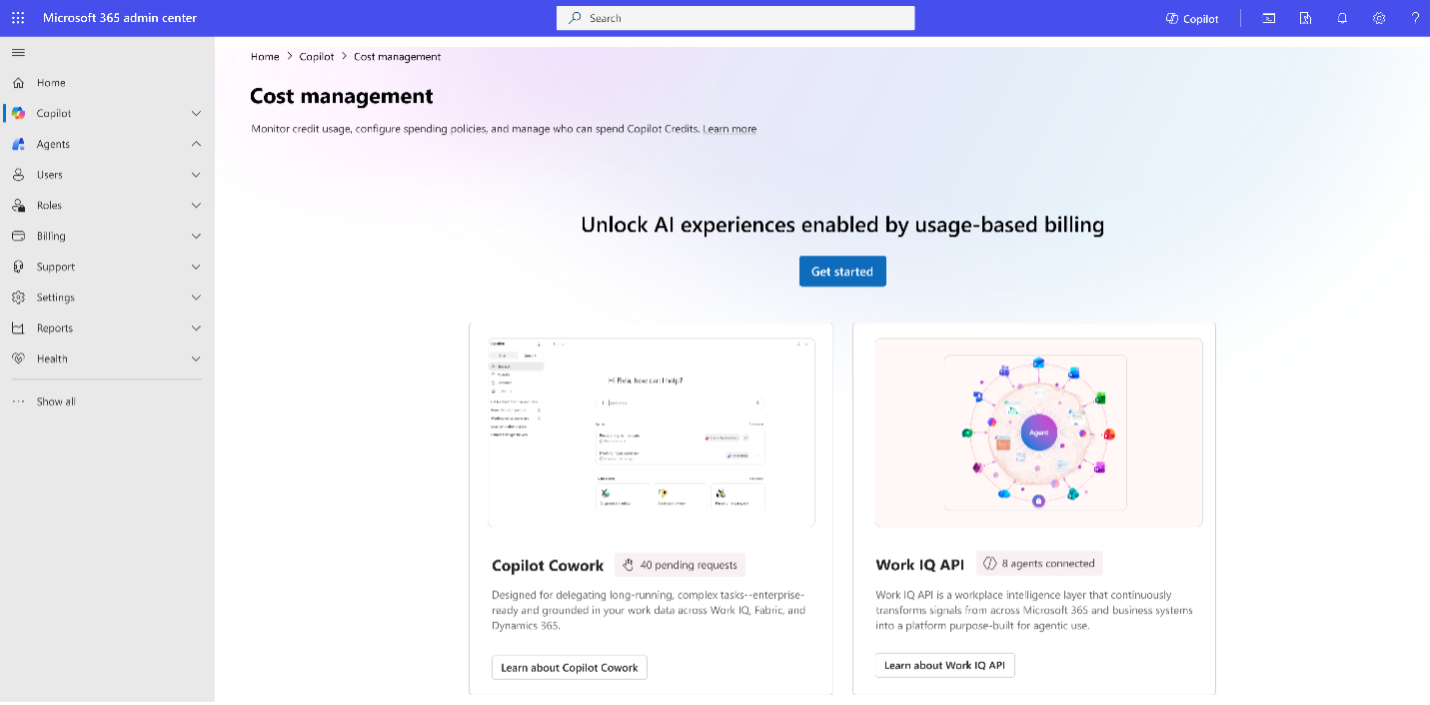
6. You control where credits come from and who can spend them. All of this is governed from the Microsoft 365 admin center → Copilot → Cost Management dashboard, where administrators set the billing method — pay-as-you-go, Capacity Packs, or a P3 Pre-Purchase Plan — allocate credits, define spending policies, and apply hard caps and alerts at the tenant, group, or user level.
In one sentence: A Copilot Credit is the penny-priced "meter reading" for agentic AI work — pooled across your tenant, consumed by four measurable factors, and fully governed from a single admin dashboard so a variable bill never becomes an unpredictable one.
P3 Discount Tiers
It's a one-year, pay-upfront pool of Copilot Credit Commit Units (CCCUs). Nine tiers — the more you commit, the deeper the discount:
|
Tier |
Credits |
List price |
Discount |
Effective Cost |
|
1 |
300,000 |
$3,000 |
5% |
$2,850 |
|
2 |
1,500,000 |
$15,000 |
6% |
$14,100 |
|
3 |
3,000,000 |
$30,000 |
7% |
$27,900 |
|
4 |
15,000,000 |
$150,000 |
8% |
$138,000 |
|
5 |
30,000,000 |
$300,000 |
10% |
$270,000 |
|
6 |
75,000,000 |
$750,000 |
12% |
$660,000 |
|
7 |
150,000,000 |
$1,500,000 |
14% |
$1,290,000 |
|
8 |
225,000,000 |
$2,250,000 |
17% |
$1,867,500 |
|
9 |
300,000,000 |
$3,000,000 |
20% |
$2,400,000 |
Go to Copilot and then the Cost Management node to get started with usage-based billing
Where else do Copilot Credits get used?
Because credits are a single, tenant-wide currency, Cowork is only one of several Microsoft AI experiences that draw from the same pool. As Microsoft expands its agentic platform, those same credits increasingly pay for work happening well beyond Cowork:
Work IQ APIs — When developers tap Microsoft’s workplace-intelligence layer directly through its APIs, usage is billed in credits: a variable charge for query-style work (grounding, retrieval, and reasoning), plus a flat 0.1 credit per call for the Tools API that takes actions on a user’s behalf.
Microsoft Copilot Studio agents — Custom agents you build and deploy consume credits as they retrieve information, respond to prompts, and run workflows or AI tools on a user’s behalf — including voice agents, which are billed by total call length.
Dynamics 365 agents — Both prebuilt and custom agents across Dynamics 365 draw from the same tenant credit pool, allocated to environments to manage usage across workloads.
Power Platform (Power Apps & Power Automate) — Credits apply only when AI or agentic features are invoked — generative AI, summarization, document processing, or an embedded Copilot Studio agent.
What doesn’t draw credits: the everyday Microsoft 365 Copilot experiences your per-user license already covers — Copilot Chat, the Copilot features in Word, Excel, PowerPoint, Outlook, and Teams, and Microsoft’s built-in agents like Researcher, Analyst, and Facilitator. Those stay on the flat monthly subscription. In short, credits meter the
autonomous, agentic work that runs on top of Copilot — and because every one of these services shares the same pooled balance, you can govern and budget all of it from the same admin dashboard.
The bottom line
Usage-based billing ties cost directly to value. The key is governance: turn it on deliberately, set limits early, and track ROI. Coretek can help you plan, configure, and budget for Cowork with confidence — reach out to your Customer Success team to get started.
Additional Links:
Copilot Cowork is now generally available | Microsoft 365 Blog
Managing AI experiences enabled by usage-based billing | Microsoft Learn